

DOMINATOR: DIY Stopwatch kit for Airsoft, Paintball
About DOMINATOR – Airsoft Stopwatch
DOMINATOR is a stopwatch created for Airsoft, Paintball as a DIY Kit, which increases the game experience and brings fairness. They are suitable for the DOMINATOR, Capture the Point game mode. DOMINATOR creates a point that is occupied by a team player. The device includes an LCD character display that informs about the current time of each team. At the same time, an LED diode signals the active team on the point. Based on RFID or button version, a player occupies the DOMINATOR point by attaching an RFID bracelet or card to it, or by holding a team's button for 5 seconds. When the point is occupied, an alarm beeps, announcing a change on the point. The team's time is counted until a player from another team attaches their RFID tag, or until the time is stopped by the referee. Time continues to count after the point is occupied. DOMINATOR counts the total time occupied by all teams in the game. Can be used for 2 or 4 teams in one game. In addition to stopping the clock, the referee may also reset it before a new game.
Usage Scenarios
Ideal for playgrounds, fields offering Airsoft / Paintball experience. Events such as LARP, MilSim, Scenario, Speedball, due the flash size that supports hundrets of RFID tags in a single application
Supported hardware
With RFID DOMINATOR 2.0 PCB, the following components are compatible
DEMO firmware
RFID DOMINATOR offers free to use DEMO firmware that allows you to test the device and its basic functions, if wired properly as on schematics available on the webpage of RFID DOMINATOR
Modular design, Portable firmware
Modular design of RFID DOMINATOR allows user to replace main components without needing to solder anything. By hot-swap method he can remove module and put there new one within seconds. User can copy and clone firmware to any amount of his devices. All components are cheap, easy to assembly, repair or produce.
Affordable
Cloneable
Easy to use
Open-source HW friendly
RFID enabled
Modular design
Display output
Support & feedback
Details

PCB
RFID DOMINATOR 2.0 PCB specifications
104 x 103 x 1,6 mm, double-sided FR4 type PCB. Silkscreen on the PCB marks position and orientation of components, how these need to be soldered.

Open-source hardware support
Hardware compatible with open-source hardware
RFID DOMINATOR's hardware is related to open-source hardware usage. It is using Arduino modules and Arduino board itself for modular design and its advantages of open-source hardware (cost-effective, easy to replace).

Assembled PCB
View on the PCB, after it was assembled by compatible components
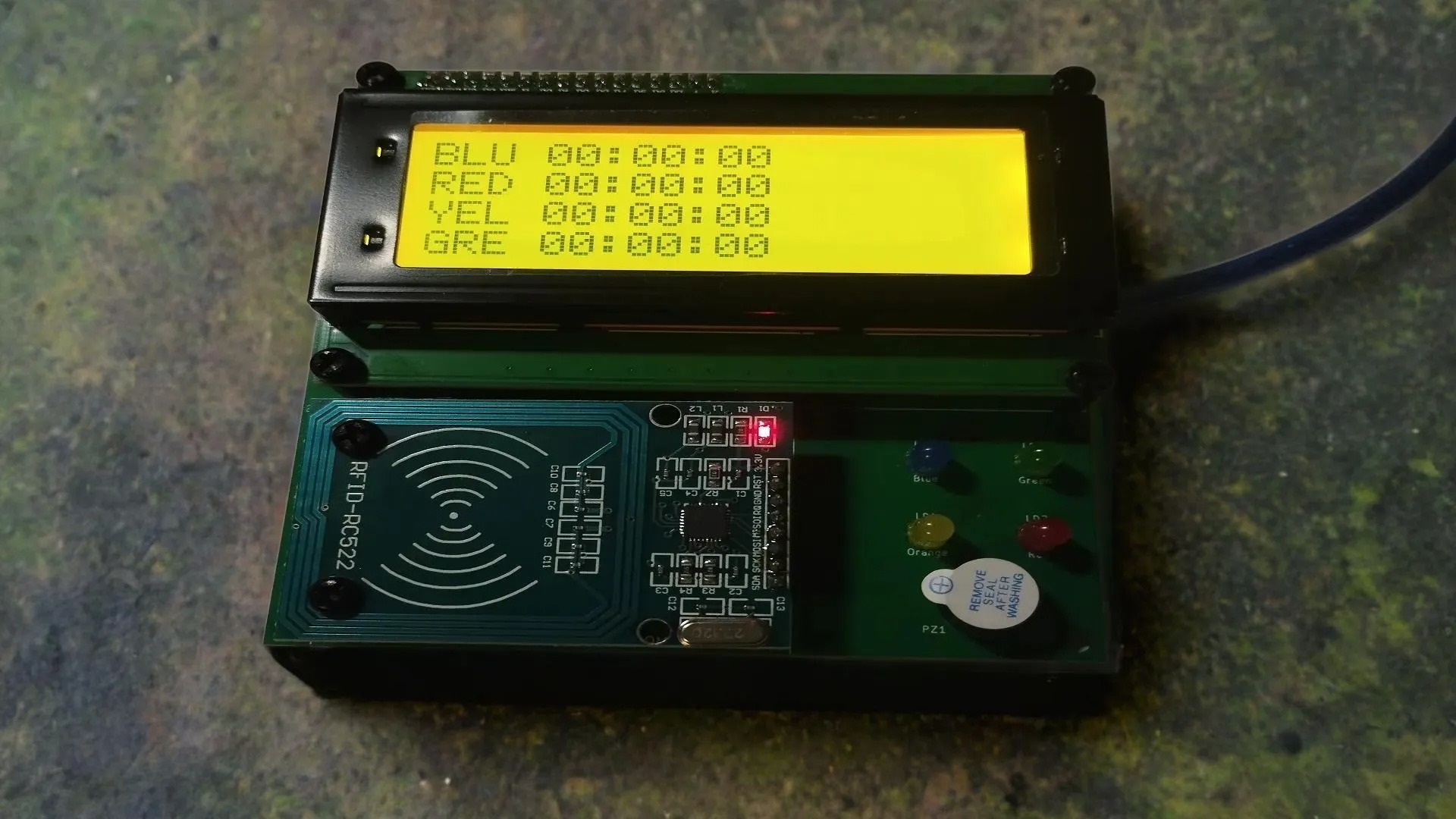
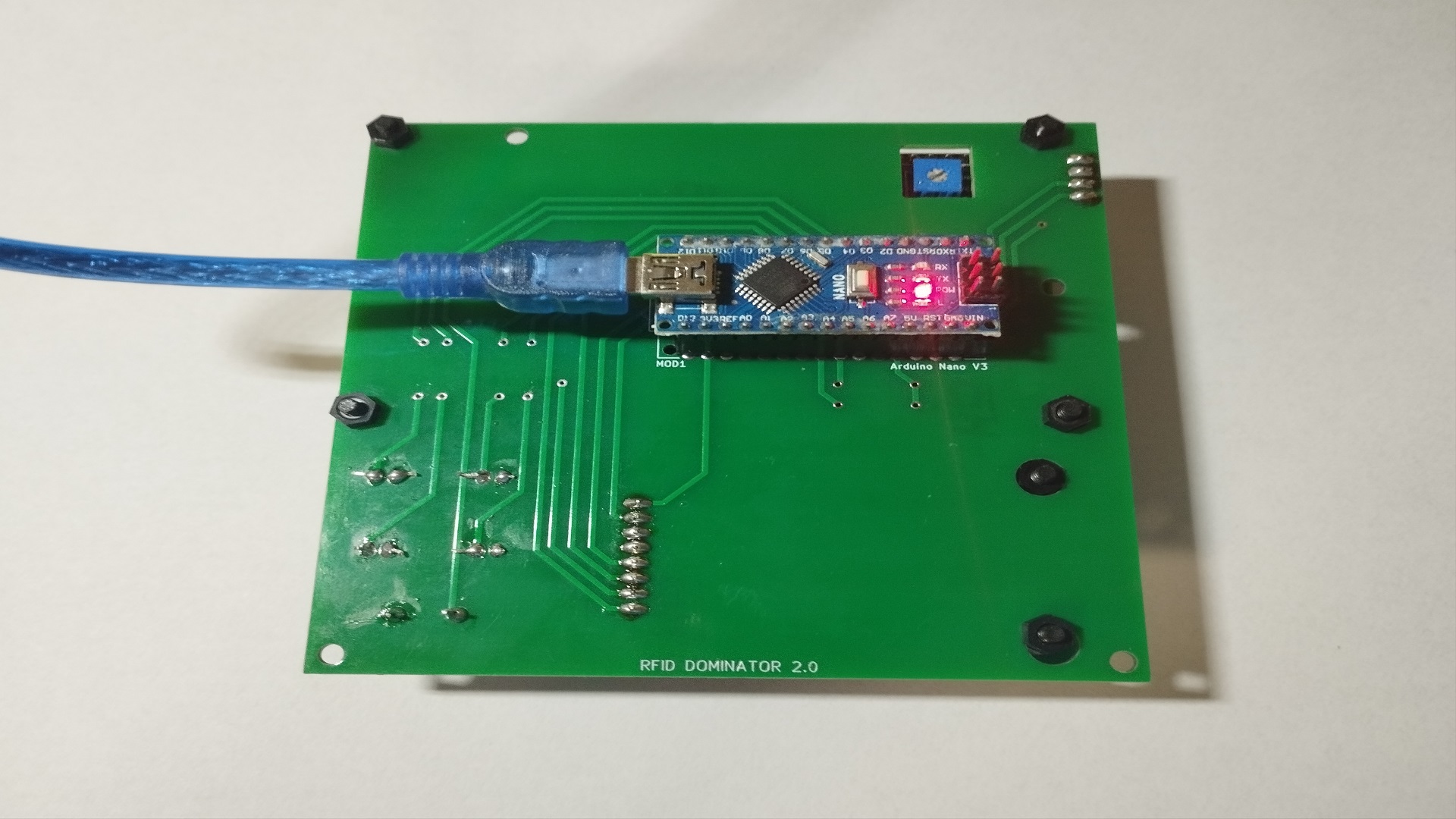
After the RFID DOMINATOR 2.0 PCB is assembled, total height of the PCB is extended to 45 mm. On the front side, there is LCD2004A screen and MFRC522 reader, alongside with LED diodes and buzzer. From the back side, there is Arduino Nano V3.0 controller. The main components are using pin headers.

Enclosure
3D printed enclosure for RFID DOMINATOR 2.0
Enclosure compatible with PCB of RFID DOMINATOR 2.0. Dimensions of the enclosure is 124 x 123 x 47 mm. PCB itself is mounted from the inside, on the front side of the enclosure using 4 pcs of M3 screws. There is possible to use 25 mm (width) tie-belt on the enclosure to mount it on the tree, joist.
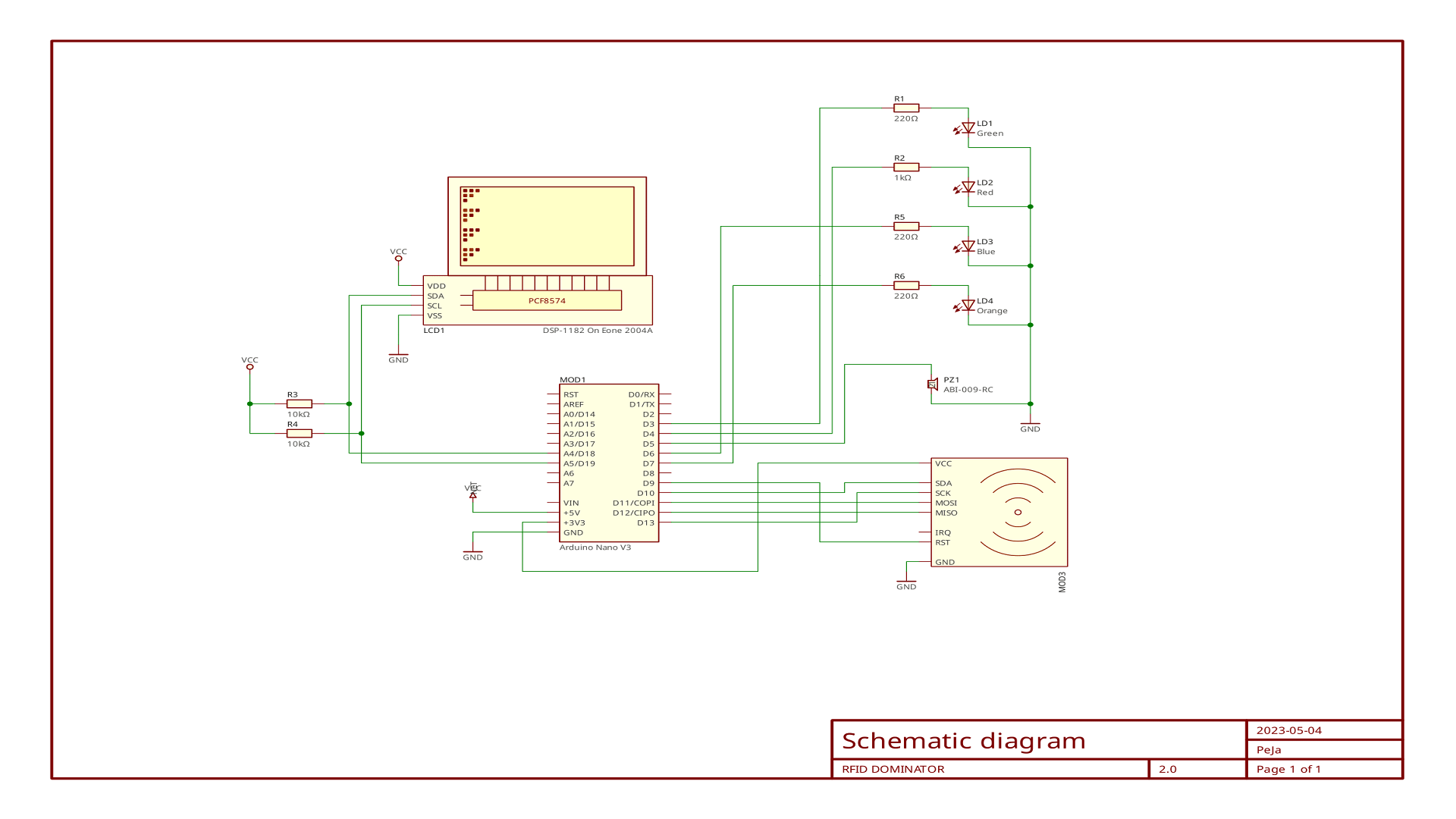
Wiring diagram
Wiring diagram for RFID DOMINATOR 2.0
Wiring diagram shows, how Arduino Nano is wired with all other components. For LCD2004A, there is used hardware-wired I2C bus and for MFRC522 SPI-bus. Additional GPIOs are used for LED diodes indications and for buzzer with PWM support.

Button DOMINATOR
Prototype of mechanical button DOMINATOR
Standard PCB of RFID DOMINATOR 2.0 can be also used for Button DOMINATOR. The only change is that, RFID reader is removed and two buttons are inserted with optional diameter (standardly 16 up to 22 mm), also possible to use buttons with LED backlight, that allows to use DOMINATOR at dark spaces or during night events.
Gallery




Frequently Asked Questions
Below are the most frequently asked questions from our community.
What Is the Energy Consumption of the System?
The system typically consumes 40–60 mAh @ 5V, equivalent to 0.2–0.3 W. A 2000 mAh power source can run the system for 30–35 hours, depending on the load.
Can I Power It via Powerbank?
Yes, the RFID DOMINATOR can be powered directly using a powerbank through its 5V output. RFID DOMINATOR requires MiniUSB connector, there can be some versions of Arduino Nano with microUSB connector aswell.
How Can I Upload the Firmware?
Whether it’s DEMO or FINAL firmware, use the provided .hex file compatible with Arduino. Upload it using the XLoader tool. For Arduino Nano with the Old Bootloader, set the speed to 57600 baud/s, for the New Bootloader, use 115200 baud/s. Successful upload is confirmed by a message from XLoader, it can inform you about unsuccessful upload process.
How to Copy Existing Firmware?
Simply upload the same firmware file (.hex) you have received via email to your next RFID DOMINATOR unit. It will work by the same way and will react to the same RFID wristbands and cards. There’s no limit to the number of clones you can create, it's up to you.
Can be a team name changed?
Not at the moment, but soon it will be possible, when AT commands extension will be finished. Team names need to have maximum 3 letters (it will be limited by the software).
Can DOMINATOR be used outdoors?
DOMINATOR does not have a waterproof case. If it is dry, it can also be used outdoors. Mainly used indoors or under a shelter.
In what form is DOMINATOR available?
RFID DOMINATOR is available in the form of the minimum version source code - removed buzzer, exclusive use of LCD 20x4 display, max. 1 RFID card per entity. The button DOMINATOR is available as .hex machine code, which can be directly run on an ATmega328P MCU (Arduino Uno, Nano), without access to the source code. DPS design files, .STL files of the 3D printed box are not provided with the software.

RFID DOMINATOR - source code:
Minimal version, 1 card per team, no buzzer, only for 20x4 LCD screen
Test RFID DOMINATOR on your PC in Wokwi Simulator! - Click here
//RFID DOMINATOR 2.0 - Domination Timer for Airsoft, USAGE UNDER MIT LICENSE!
//BLUE AND YELLOW TEAM, MINIMAL FUNCTIONALITY, ONE CARD / WRISTBAND PER TEAM
//BUZZER NOT INCLUDED, only 20x4 LCD screen supported
//Author: Martin Chlebovec (martinius96@gmail.com)
//Revision --> 20th February 2026
//Project info: https://your-iot.github.io/DOMINATOR/

//Installation instructions:
//Download library MFRC522 from: https://github.com/miguelbalboa/rfid/releases/tag/1.4.11 (Click on Source code (zip))
//Download library LiquidCrystal_I2C from: https://github.com/fdebrabander/Arduino-LiquidCrystal-I2C-library (click on Code --> Download ZIP)

//Open .zip and copy whole directory into C:/Users/[actual user]/Documents/Arduino/libraries
//Now you can compile this source code

//For Arduino Nano with Old Bootloader, navigate to Tools --> Board --> Arduino Nano
//Tools --> Processor --> ATMega328P (Old Bootloader) - that will reduce upload speed to 57600 baud/s
//Standardly all Arduino Nano V3.0 has Old Bootloader (Blue clones)
//For standard bootloader nothing is required to set, only Arduino Nano under Tools --> Board (default)

#include <LiquidCrystal_I2C.h>
#include <SPI.h>
#include <Wire.h>
#include <MFRC522.h>

//Pinout compatible for Arduino Nano with MFRC522 (NXP RC522) on RFID DOMINATOR 2.0 PCB board
#define SS_PIN 10
#define RST_PIN 9

MFRC522 rfid(SS_PIN, RST_PIN);

//Known RFID cards UIDs based on teams (You can see UID of your cards in Serial monitor when attached)
const unsigned long TEAM_BLU = 4321; //BLUE TEAM UID --> BLUE CARD
const unsigned long TEAM_YEL = 17933; //YELLOW TEAM UID --> YELLOW CARD
const unsigned long TEAM_REFEREE = 7921; //REFEREE GROUP UID --> GREEN CARD
const unsigned long TEAM_ERASER = 4294948592; //ERASER GROUP UID --> RED CARD

unsigned long code; //UID --> RFID CARD ADDRESS
boolean run = false; //is BLU team active on DOMINATION TIMER?
boolean run2 = false; //is YEL team active on DOMINATION TIMER?

unsigned long timer = 0; //timer 32-bit - GAME TIMER
unsigned long timer2 = 0; //timer 32-bit - RFID CHECK TIMER


boolean once = false; //was once-timed action created yet?
//TIME RELATED VARIABLES FOR TEAM RED
int second = 0; //seconds of team RED
int minute = 0; //minutes of team RED
int hour = 0;   //hours of team RED

//TIME RELATED VARIABLES FOR TEAM GRE
int second2 = 0; //seconds of team GRE
int minute2 = 0; //minutes of team GRE
int hour2 = 0; //hours of team GRE

//OUTPUTS
const int BLU_LED = 6; //LED for team RED
const int RED_LED = 4; //LED for team GRE
const int ORA_LED = 7; //LED for team RED
const int GRE_LED = 3; //LED for team GRE

LiquidCrystal_I2C* lcd;

//user-defined functions declaration
void updateLCD();
void updateLCD2();
void tickClock();
void tick();
byte error, address;
void setup() {
  Serial.begin(9600); //Start UART bus at 9600 baud/s
  Serial.println(F("RFID Domination Timer 2.0 - freeware 9th February 2026"));
  Serial.println(F("Creator: Martin Chlebovec (martinius96@gmail.com)"));
  Serial.println(F("Project info: https://your-iot.github.io/DOMINATOR/"));
  SPI.begin(); //Standard SPI speed for RC522 --> 4 MHz
  Wire.begin(); //Standard I2C speed for LCD screen --> 100 kHz
  for (address = 1; address < 127; address++ ) //this cycle will scan I2C bus and set LCD display automatically with any I2C address
  {
    Wire.beginTransmission(address);
    error = Wire.endTransmission();
    if (error == 0)
    {
      Serial.print("I2C device found at address 0x");
      if (address < 16)
        Serial.print("0");
      Serial.print(address, HEX);
      Serial.println("  !");
      break;
    }
  }
  lcd = new LiquidCrystal_I2C(address, 20, 4); //display initialization
  pinMode(BLU_LED, OUTPUT);
  pinMode(RED_LED, OUTPUT);
  pinMode(ORA_LED, OUTPUT);
  pinMode(GRE_LED, OUTPUT);
  rfid.PCD_Init(); // Init MFRC522
  rfid.PCD_SetAntennaGain(rfid.RxGain_max);
  rfid.PCD_DumpVersionToSerial(); //Write version of Firmware to UART
  lcd->begin(); //Not valid for Wokwi simulator, valid for LiquidCrystal_I2C library from @fdebrabander
  lcd->backlight(); //backlight on
  lcd->clear();
  lcd->setCursor(0, 0);
  lcd->print(F(" RFID DOMINATOR 2.0 "));
  lcd->setCursor(0, 2);
  lcd->print(F("   DEVELOPED  BY:   "));
  lcd->setCursor(0, 3);
  lcd->print(F("  Martin Chlebovec  "));

  for (int i = 0; i < 20; i++) {
    // LED animation effect, loading
    switch (i % 4) {
      case 0:
        digitalWrite(BLU_LED, HIGH);
        delay(250);
        digitalWrite(BLU_LED, LOW);
        break;
      case 1:
        digitalWrite(GRE_LED, HIGH);
        delay(250);
        digitalWrite(GRE_LED, LOW);
        break;
      case 2:
        digitalWrite(RED_LED, HIGH);
        delay(250);
        digitalWrite(RED_LED, LOW);
        break;
      case 3:
        digitalWrite(ORA_LED, HIGH);
        delay(250);
        digitalWrite(ORA_LED, LOW);
        break;
    }

    //print loading bar
    lcd->setCursor(i, 1);
    lcd->write(byte(255)); // plný znak
  }
  delay(500);
  lcd->clear();
  lcd->setCursor(0, 0);
  lcd->print(F("BLU 00:00:00")); //BLUE TEAM IN ROW 1
  lcd->setCursor(0, 1);
  lcd->print(F("YEL 00:00:00")); //YELLOW TEAM IN ROW 2
  lcd->setCursor(0, 2);
  lcd->print(F("  Martin Chlebovec  "));
  lcd->setCursor(0, 3);
  lcd->print(F(" RFID DOMINATOR 2.0 "));
}

void loop() {
  tickClock();
  if ((millis() - timer2) >= 300) { //Check for incomming datas from RC522 reader each 300 ms
    timer2 = millis();
    if (rfid.PICC_IsNewCardPresent() && rfid.PICC_ReadCardSerial()) {
      dump_byte_array(rfid.uid.uidByte, rfid.uid.size);
      rfid.PICC_HaltA();
      rfid.PCD_StopCrypto1();

      if (code == TEAM_BLU) { // WAS CARD FROM TEAM BLUE?
        if (!run) {
          timer = millis();
        }
        Serial.println(F("Detected card from team BLU"));
        digitalWrite(BLU_LED, HIGH);
        digitalWrite(RED_LED, LOW);
        digitalWrite(ORA_LED, LOW);
        digitalWrite(GRE_LED, LOW);
        run = true;
        run2 = false;
      }

      if (code == TEAM_YEL) { //WAS CARD FROM TEAM YELLOW?
        if (!run2) {
          timer = millis();
        }
        Serial.println(F("Detected card from team YEL"));
        digitalWrite(BLU_LED, LOW);
        digitalWrite(RED_LED, LOW);
        digitalWrite(ORA_LED, HIGH);
        digitalWrite(GRE_LED, LOW);
        run = false;
        run2 = true;
      }

      if (code == TEAM_REFEREE) { //WAS CARD FROM TEAM REFEREE?
        Serial.println(F("Detected card from REFEREE"));
        digitalWrite(BLU_LED, LOW);
        digitalWrite(RED_LED, LOW);
        digitalWrite(ORA_LED, LOW);
        digitalWrite(GRE_LED, LOW);
        run = false;
        run2 = false;
      }

      if (code == TEAM_ERASER) { //WAS CARD FROM TEAM ERASER?
        Serial.println(F("Detected card from ERASER"));
        digitalWrite(BLU_LED, LOW);
        digitalWrite(RED_LED, LOW);
        digitalWrite(ORA_LED, LOW);
        digitalWrite(GRE_LED, LOW);
        //Zero each value for times
        second = 0;
        minute = 0;
        hour = 0;
        second2 = 0;
        minute2 = 0;
        hour2 = 0;
        updateLCD();
        updateLCD2();
        //Stop active team
        run = false;
        run2 = false;
      }
    }
  }
}

void tickClock() {
  if ((millis() - timer) >= 1000) { //Timer for counting time each 1000 ms (second resolution)
    timer = millis();
    //Serial.println(timer); //UNCOMMENT TO GET TIMER PRECISION INFO, if couting in 1000 ms or more
    if (once == false) {
      timer2 = millis();
      once = true;
    }
    error = Wire.endTransmission(); //check, if display was disconnected during operation, if yes, that will renew is connection and initialization
    if (error != 0) {
      Serial.println("Display is not communicating");
      // Communication error, re-initialize the communication with the LCD
      lcd->begin(); //Not valid for Wokwi simulator, valid for LiquidCrystal_I2C library from @fdebrabander
      lcd->backlight();
      lcd->setCursor(0, 0);
      lcd->print(F("BLU   :  :  ")); //BLU TEAM IN ROW 1
      updateLCD();
      lcd->setCursor(0, 1);
      lcd->print(F("YEL   :  :  ")); //YEL TEAM IN ROW 2
      updateLCD2();
    }
    tick();
    tick2();
  }

}
void tick() {
  if (run) {
    //  updateLCD(); //print team 1 numbers (BLUE)
    second++;
    if (second >= 60)
    {
      second = 0;
      minute++;
      if (minute >= 60)
      {
        minute = 0;
        hour++;
      }
    }
    updateLCD();
  }
}

void tick2() {
  if (run2) {
    //   updateLCD2(); //print team 2 numbers (YELLOW)
    second2++;
    if (second2 >= 60)
    {
      second2 = 0;
      minute2++;
      if (minute2 >= 60)
      {
        minute2 = 0;
        hour2++;
      }
    }
    updateLCD2();
  }
}

void updateLCD() {
  lcd->setCursor(4, 0);
  if (hour < 10) {
    lcd->print(F("0"));
  }
  lcd->print(hour, DEC);
  lcd->setCursor(7, 0);
  if (minute < 10) {
    lcd->print(F("0"));
  }
  lcd->print(minute, DEC);
  lcd->setCursor(10, 0);
  if (second < 10) {
    lcd->print(F("0"));
  }
  lcd->print(second, DEC);
}

void updateLCD2() {
  lcd->setCursor(4, 1);
  if (hour2 < 10) {
    lcd->print(F("0"));
  }
  lcd->print(hour2, DEC);
  lcd->setCursor(7, 1);
  if (minute2 < 10) {
    lcd->print(F("0"));
  }
  lcd->print(minute2, DEC);
  lcd->setCursor(10, 1);
  if (second2 < 10) {
    lcd->print(F("0"));
  }
  lcd->print(second2, DEC);
}


void dump_byte_array(byte *buffer, byte bufferSize) {
  for (byte i = 0; i < bufferSize; i++) {
  }
  Serial.print(F("Detected UID (code) of RFID CARD: "));
  code = 10000 * buffer[4] + 1000 * buffer[3] + 100 * buffer[2] + 10 * buffer[1] + buffer[0]; //Final UID (reverse order, byte 5 as MSB
  Serial.println(code); //UID
}